Marmoset Lift

Your website siteplan, in 3D.

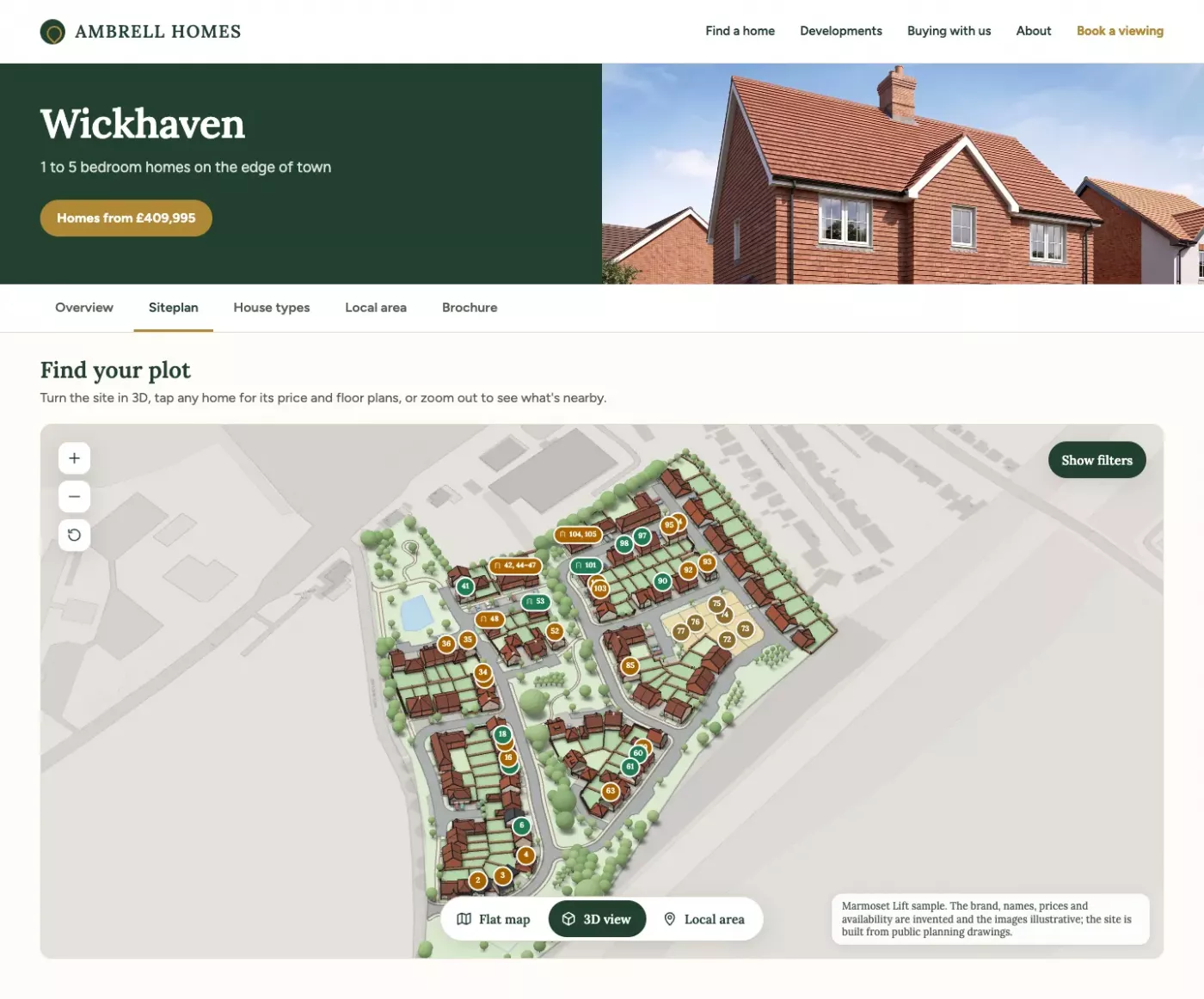
Most development pages still show the siteplan as a picture, or a basic clickable plan with availability in a separate list. Lift swaps that for an illustrated 3D siteplan buyers can turn, with availability on every plot, the floor plans on the house itself and a map of what’s nearby, with a satellite view. As an optional upgrade, buyers can step inside each home too. Already have a Marmoset app? Its siteplan embeds in your website instead.

From £1,500 + VAT. Book a Lift demo Try the sample
Four things to try

What your buyers can do

Each one’s a short clip from our sample site. Hover to watch, or scroll down and have a go yourself.

Turn the site in 3D

One tap lifts the plan into 3D. Buyers drag to turn it and pinch to zoom, and Flat map takes them straight back to the plan. The homes come from the drawings, down to the chimneys, dormers, garage doors and garden gates.

Find the right home

Every plot shows whether it’s available, reserved or sold. Buyers filter by bedrooms and price, and the homes that don’t fit drop out of the way.

Floor plans on the house

Tap a home, then Floor plans. The view drops onto the house and the plan sits where the roof was, floor by floor, and opens full screen to read the rooms.

The local area

Tap Local area and the map carries on past the site, with the schools, stations, supermarkets, GPs, parks and pubs round it, flat or in 3D. Tap one kind of place and the map frames them, or tap Satellite for the aerial view.

Optional upgrade

Step inside each home

Lift also supports an optional upgrade that opens up every home from its plot. Buyers go from the site to the house itself, built from your drawings, and look round it floor by floor.

Explore the home

Tap a home, then Explore home. The rest of the site greys back and the view flies in to the house, with its real brick, tiles, windows and doors. Buyers turn it to see every side, then step through the floors, which open up like a plan with the walls cut away. On a semi or a terrace the whole building shows, and a tap on next door looks round that one instead.

Tap a room for its size

Each room is named on the plan. Tap one and it lights up, with its size wall to wall and its floor area in square metres and square feet.

Measure anything

Tap the ruler, then two points. The ends snap to the walls, so buyers can check the wall for the sofa or the space for a wardrobe.

The light through the day

Slide through a summer’s day and the sun moves round the house as it would on that plot, so buyers can see when the garden gets the sun and how the light falls into the rooms.

Have a go on our sample site

The sample site in 3D

Elderlea is a sample site. The brand, names, prices and availability are made up and the images illustrative, but the site is built from real drawings, the same way we’d build yours.

A mock-up of a made-up developer’s page, with Lift where the plan would be.
On your website

It goes where your plan image is now

Lift drops into your development page as a simple embed, in place of the plan image or the clickable plan you have today. It runs in any modern browser, so there’s nothing for buyers to install.

Availability and prices come from a simple CMS your sales team update, or we can hook it up to your own system’s API.

What we need and how long

Nothing new to commission

We build it from what you already produce for marketing: your house-type CGIs, floor plans and siteplan, plus the planning drawings. There’s no site to model and no aerial CGI to pay for.

We can show you a first look built from your planning drawings, and once we have the DWGs the finished version is live in under two weeks.

Until then it’s illustrative, like the samples: built from the drawings, checked by eye, and only as exact as the drawings it comes from. If you later want the full Marmoset sales app for your marketing suite, Lift carries straight over into it.

  • Site layout and house-type drawingsIdeally as DWG files. Planning drawings are fine for a first look.
  • Materials layout and boundary planSo brick, render, roof tiles, fences and walls go on plot by plot.
  • Your house-type CGIs and floor plansThe CGIs for each home’s card, and the floor plans to sit on the houses, floor by floor.
  • Plot list and brandHouse types, bedrooms, prices and availability, plus your fonts, colours and logo.
Price

From £1,500 + VAT

Built from your drawings and set up on your website.

That’s for Lift on its own, without the full sales app. The price goes up with the size of the site, and Lift as part of the full app is quoted separately.

Send us a development and we’ll give you a price for it, along with a first look.

Want to see your own site?

Tell us which development and we’ll have a go at lifting it from the planning drawings, so you can see it before deciding anything. Happy to talk it through on a call too.